AI detector for Canvas: checking student work without repeated copying | It's AI
AI detector for Canvas: checking student work without repeated copying
An AI detector for teachers using Canvas: check student writing, see results alongside submissions, and choose automatic or manual scanning with It's AI.
Svetlana ShakhovaOct 05, 202610 min read
If you use an AI detector for teachers alongside Canvas, you may be moving each submission between the two services. You open the submission, send it for a check, then return to grading. With the next submission, you repeat those steps.
With so many questions about student AI use, this routine deserves some attention. The instructor still needs to understand the answer and assess what the student has learned. At It's AI, we think getting a detector result should be simpler: it should be available alongside the work the instructor is already reading.
Curious how your own text scores? Check it right here.
characters (min 200): 0/500000
PDF, DOCX, TXT
Deep AI Scan
find out which part of text seems AI-generated with our sentence-level segmentation.
Plagiarism check
detect plagiarized content by comparing your text against online sources.
Grammar check
find grammar and spelling mistakes in your text.
4000words left
Why AI detection in education needs to fit teachers’ work
In a College Board study published in February 2026, most of the US college and university instructors surveyed reported challenges with managing student AI use. Their responses varied considerably by subject.
Subject
Instructors reporting moderate or significant challenges
English
60%
Mathematics
27%
Source: College Board, Figure 18. The survey took place in summer 2025; 2,956 instructors answered this question. The categories describe regular or frequent incidents requiring faculty or administrative intervention, not the proportion of proven violations.
The authors link these differences to the types of assignments used. Instructors reported more challenges in subjects where assessment often relies on writing completed outside the classroom. If you regularly assign essays, questions about AI use may come up with each new set of submissions.
Another study, published in Frontiers in Education in August 2026, helps explain what this extra work involves. Sixteen engineering instructors at one US university took part in the discussions. They described redesigning assignments and spending time monitoring AI use and explaining expectations to students.
Participants also questioned the reliability of detectors in academic misconduct cases. The study did not test It's AI or measure the effectiveness of Canvas integrations. It shows how many different tasks instructors are discussing under the broad subject of AI use.
What to look for in an AI detector for teachers
Redesigning an assignment or assessing a student’s understanding requires the instructor’s involvement. Copying text into another window does not, in itself, add anything to that assessment.
So when choosing an AI detector for student writing, we would also look at how a routine check works. How many steps does it take to get a result? Where will that result be saved? Is it easy to return to a particular passage while reading?
Suppose an instructor uses an AI writing detector to check a set of essays. A separate service can provide a report for each text. But the instructor still needs to match those reports to the submissions and keep them available. When checks are frequent, the ease of that process becomes part of the detector’s value.
The studies do not give us a basis for promising a specific number of hours saved. Our point is more concrete: if a check is needed, there is little reason to transfer the text manually each time when an integration with the submission system is available.
AI detection in Canvas puts results beside student work
Canvas is a platform for courses and assignments. Instructors can view submitted work and grade it in SpeedGrader.
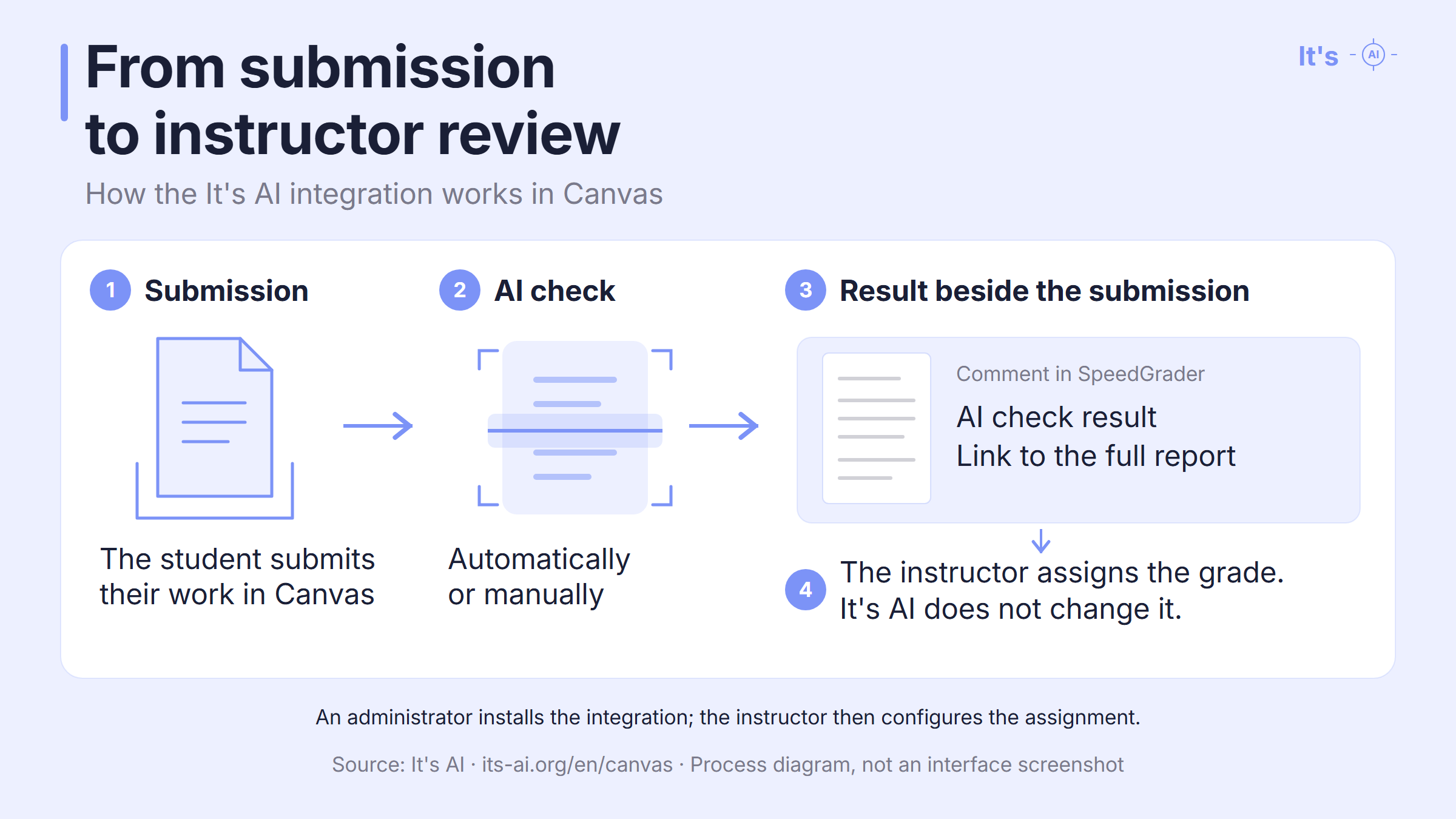
The It's AI integration with Canvas adds the check result and a report link as a SpeedGrader comment. The full report highlights sentences with signs of AI generation. The instructor can access this information alongside the student’s submission.
Each assignment can be set to scan incoming submissions automatically or run checks manually. A dashboard lists students and their submission attempts, along with the scan status and result.
It's AI does not change the grade. The instructor decides how to assess the student’s answer.
Who can request an AI detector integration in Canvas?
This process allows an instructor to initiate a request, though final approval is handled separately. Other institutions may follow a different process.
A Canvas account administrator installs It's AI. Once it is available, the tool can be added to a suitable assignment as an External Tool.
If you want to check student work for AI within your course, you can discuss a specific need with your administrator: getting the report where you already read and grade submissions. You can start by requesting a demonstration of It's AI in Canvas to see whether this process suits your assignments.
FAQ: AI detection for teachers using Canvas
These questions cover student access and the types of assignments the integration supports.
Can teachers use a Canvas AI detector without extra accounts?
Teachers and students can use the It's AI detector in Canvas without creating separate It's AI accounts. The integration uses their existing Canvas login, according to the It's AI product documentation.
Can an AI detector check PDF and Word assignments in Canvas?
The It's AI integration can check text from PDF, DOCX and TXT files submitted through its Canvas assignment. Students can also paste text directly. According to the product documentation, the integration extracts the text from uploaded files for analysis.
Can students see AI detector results in Canvas?
With It's AI, student access to AI detector results depends on the assignment settings. An instructor can hide the results, show the AI score, or provide the full report with highlighted passages. The instructor receives the full result. These options are described on the It's AI Canvas integration page.
Does Canvas support AI detection for group assignments?
The It's AI integration described here uses the External Tool submission type. Canvas documentation states that this submission type does not support group assignments or peer reviews.